


Webサイトに動画を載せるとき、「MP4は重い」と言われませんか。「軽量化のためにWebMにしたいけど変換がよくわからない」「オンライン変換は不安」など、そんな悩みはありませんでしょうか。
動画をアップロードせず、ブラウザ内だけでMP4→WebM変換できるツールを作りました。
ffmpeg.wasm を使い、画質とサイズのバランスを調整できるようにしています。
ffmpeg.wasmは結構前から存在していますね。
ffmpeg.wasmの解説はこちら:
GIGAZIN
https://gigazine.net/news/20201109-ffmpeg-wasm/

ffmpeg.wasmは元々ffmpegという動画変換ツールをWebブラウザ上で動かすために移植したもので、JavaScriptから直接動画変換が可能になります。
動画の容量が多いのは当たり前のことなんですが。少しでも読み込みを軽くしたいその気持ち。わかります。
でもアストロウェーブで、そんなことできるのか、さっぱりわかりません。
しかし今はAIがあります。
【共有】MP4をWebMに変換したいサンプルページ
変換サービスのサイトは、検索するといっぱいあります。
どれを使っていいかわからないし、変な広告がいっぱいで不安。画質もアレです。
自分用に作ろうと思いました。
MP4をWebMに変換したい(サンプルページ)
https://astrowave.jp/amnesia_record/webp_mv.php

ざっくり技術的な仕組み
- ffmpegをWebAssembly化したもの
- JavaScript から ffmpeg を直接実行
- 動画データはブラウザ内のメモリだけで処理

つまり、動画は外部サーバーに送られません。

注意点
- PCブラウザ専用(スマホ不可)
- 大きすぎる動画は時間がかかる
- 初回はffmpeg.wasmはWebAssemblyで実装されているため、実行までは読み込みに少し時間がかかる

※技術的にはffmpeg.wasmはMP4以外の形式も処理できますが、本ツールでは安定性とわかりやすさを優先して「MP4」に限定しています。
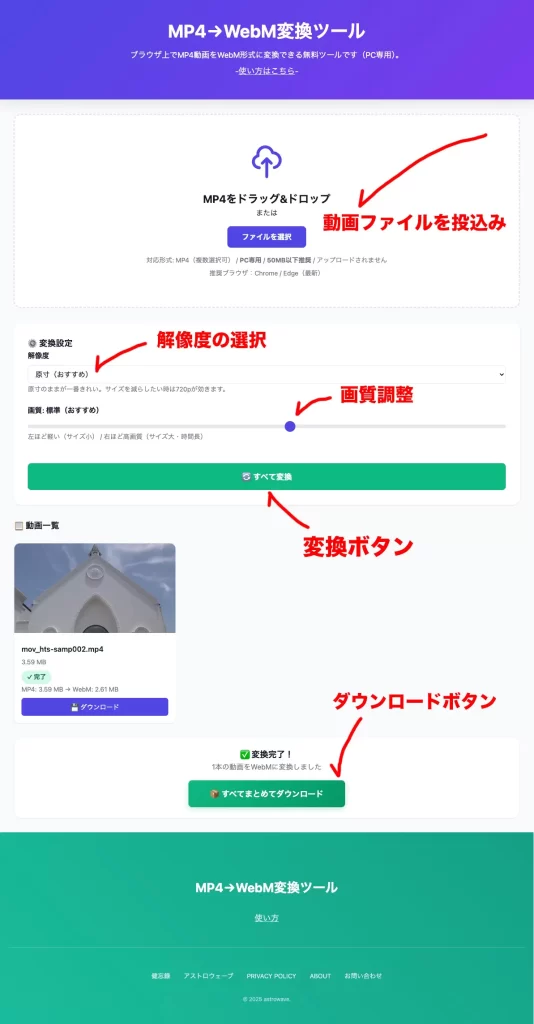
格安レンタルサーバーであること、それを正直に話。AIさんに提案してもらいました。
要件は以下です。
- 動画は一切アップロードされない
- PCブラウザ内だけで変換(サーバー処理なし)
- 画質とファイルサイズを自分で調整できる
- 複数ファイル対応
- 無料
webp_mv.php
<?php
// webp_mv.php
// ブラウザ内(ffmpeg.wasm)で MP4 → WebM 変換(サーバー処理なし)
?>
<!DOCTYPE html>
<html lang="ja">
<head>

<meta charset="UTF-8">
<meta name="viewport" content="width=device-width, initial-scale=1.0">
<meta name="author" content="" />
<meta name="keywords" content="WebM, MP4, 動画変換, 無料ツール, ブラウザ内変換" />
<meta name="description" content="ブラウザ上でMP4動画をWebM形式に変換できる無料ツールです(PC専用)。" />

<title>MP4→WebM変換ツール(無料)</title>

<style>
* { margin: 0; padding: 0; box-sizing: border-box; }

:root {
  --primary: #4f46e5;
  --primary-hover: #4338ca;
  --success: #10b981;
  --error: #ef4444;
  --bg: #f9fafb;
  --card: #ffffff;
  --text: #111827;
  --text-light: #6b7280;
  --border: #e5e7eb;
}

body {
  font-family: -apple-system, BlinkMacSystemFont, 'Segoe UI', 'Roboto', sans-serif;
  background: var(--bg);
  color: var(--text);
  line-height: 1.6;
  min-height: 100vh;
}

.header {
  background: linear-gradient(135deg, var(--primary) 0%, #7c3aed 100%);
  color: white;
  text-align: center;
  padding: 3rem 2rem;
  box-shadow: 0 10px 25px rgba(0, 0, 0, 0.1);
}

.header h1 {
  font-size: 2.5rem;
  margin-bottom: 0.5rem;
}

.header h2 {
  font-size: 1.1rem;
  font-weight: 400;
  margin-bottom: 0.5rem;
}

.subtitle {
  font-size: 1.1rem;
  opacity: 0.9;
}

.subtitle a {
  color: white;
  text-decoration: underline;
  font-size: 18px;
  transition: opacity 0.3s ease;
}

.subtitle a:hover { text-decoration: none; }

.container {
  max-width: 1200px;
  margin: 0 auto;
  padding: 2rem;
}

.upload-area {
  background: var(--card);
  border: 3px dashed var(--border);
  border-radius: 1rem;
  padding: 4rem 2rem;
  text-align: center;
  transition: all 0.3s ease;
  cursor: pointer;
  margin-bottom: 2rem;
}

.upload-area:hover {
  border-color: var(--primary);
  background: #fafbff;
}

.upload-area.dragover {
  border-color: var(--primary);
  background: #f0f4ff;
  transform: scale(1.02);
}

.upload-icon {
  width: 80px;
  height: 80px;
  margin: 0 auto 1rem;
  color: var(--primary);
}

.btn-primary {
  background: var(--primary);
  color: white;
  border: none;
  padding: 0.75rem 2rem;
  border-radius: 0.5rem;
  font-size: 1rem;
  font-weight: 600;
  cursor: pointer;
  transition: all 0.2s ease;
  margin: 1rem 0;
}

.btn-primary:hover {
  background: var(--primary-hover);
  transform: translateY(-2px);
}

.settings-card {
  background: var(--card);
  padding: 2rem;
  border-radius: 1rem;
  box-shadow: 0 1px 3px rgba(0, 0, 0, 0.1);
  margin-bottom: 2rem;
  display: none;
}

.settings-card.active { display: block; }

.setting-item { margin-bottom: 1.5rem; }

.setting-item label {
  display: block;
  font-weight: 600;
  margin-bottom: 0.5rem;
}

input[type="range"] {
  width: 100%;
  height: 8px;
  border-radius: 5px;
  background: var(--border);
  outline: none;
  -webkit-appearance: none;
}

input[type="range"]::-webkit-slider-thumb {
  -webkit-appearance: none;
  width: 24px;
  height: 24px;
  border-radius: 50%;
  background: var(--primary);
  cursor: pointer;
}

select {
  width: 100%;
  padding: 0.65rem 0.75rem;
  border: 1px solid var(--border);
  border-radius: 0.5rem;
  background: #fff;
  font-size: 1rem;
}

.btn-convert {
  background: var(--success);
  color: white;
  border: none;
  padding: 1rem 3rem;
  border-radius: 0.5rem;
  font-size: 1.1rem;
  font-weight: 600;
  cursor: pointer;
  width: 100%;
  margin-top: 1.5rem;
  transition: all 0.2s ease;
}

.btn-convert:hover:not(:disabled) {
  background: #059669;
  transform: translateY(-2px);
}

.btn-convert:disabled {
  background: var(--border);
  cursor: not-allowed;
}

.preview-grid {
  display: grid;
  grid-template-columns: repeat(auto-fill, minmax(280px, 1fr));
  gap: 1.5rem;
  margin-top: 1.5rem;
}

.preview-card {
  background: var(--card);
  border-radius: 0.75rem;
  overflow: hidden;
  box-shadow: 0 1px 3px rgba(0, 0, 0, 0.1);
  transition: all 0.3s ease;
  position: relative;
}

.preview-card:hover {
  transform: translateY(-4px);
  box-shadow: 0 10px 25px rgba(0, 0, 0, 0.1);
}

.preview-image {
  width: 100%;
  height: 200px;
  object-fit: cover;
  background: #f3f4f6;
}

.preview-info { padding: 1rem; }

.preview-filename {
  font-weight: 600;
  margin-bottom: 0.25rem;
  overflow: hidden;
  text-overflow: ellipsis;
  white-space: nowrap;
}

.preview-size {
  font-size: 0.9rem;
  color: var(--text-light);
}

.status-badge {
  display: inline-block;
  padding: 0.25rem 0.75rem;
  border-radius: 9999px;
  font-size: 0.85rem;
  font-weight: 600;
  margin-top: 0.5rem;
}

.status-pending { background: #e5e7eb; color: #6b7280; }
.status-converting { background: #dbeafe; color: #1e40af; }
.status-success { background: #d1fae5; color: #065f46; }
.status-error { background: #fee2e2; color: #991b1b; }

.btn-remove {
  position: absolute;
  top: 0.5rem;
  right: 0.5rem;
  background: rgba(239, 68, 68, 0.9);
  color: white;
  border: none;
  width: 28px;
  height: 28px;
  border-radius: 50%;
  cursor: pointer;
  font-size: 1rem;
  opacity: 0;
  transition: all 0.2s ease;
}

.preview-card:hover .btn-remove { opacity: 1; }

.btn-remove:hover {
  background: #dc2626;
  transform: scale(1.1);
}

.btn-download {
  background: var(--primary);
  color: white;
  border: none;
  padding: 0.5rem 1rem;
  border-radius: 0.375rem;
  font-size: 0.9rem;
  cursor: pointer;
  margin-top: 0.5rem;
  width: 100%;
}

.btn-download:hover { background: var(--primary-hover); }

.download-all-section {
  background: var(--card);
  padding: 1.5rem;
  border-radius: 1rem;
  box-shadow: 0 1px 3px rgba(0, 0, 0, 0.1);
  margin-top: 2rem;
  text-align: center;
  display: none;
}

.download-all-section.active { display: block; }

.btn-download-all {
  background: linear-gradient(135deg, var(--success) 0%, #059669 100%);
  color: white;
  border: none;
  padding: 1rem 3rem;
  border-radius: 0.5rem;
  font-size: 1.1rem;
  font-weight: 600;
  cursor: pointer;
  transition: all 0.2s ease;
  box-shadow: 0 4px 12px rgba(16, 185, 129, 0.3);
}

.btn-download-all:hover {
  transform: translateY(-2px);
  box-shadow: 0 6px 16px rgba(16, 185, 129, 0.4);
}

.download-all-section p { color: var(--text-light); margin-bottom: 1rem; }

.progress-section {
  background: var(--card);
  padding: 2rem;
  border-radius: 1rem;
  text-align: center;
  margin-bottom: 2rem;
  display: none;
}

.progress-section.active { display: block; }

.progress-bar {
  width: 100%;
  height: 24px;
  background: var(--border);
  border-radius: 12px;
  overflow: hidden;
  margin: 1rem 0;
}

.progress-fill {
  height: 100%;
  background: linear-gradient(90deg, var(--primary), #7c3aed);
  transition: width 0.3s ease;
  border-radius: 12px;
}

.hint { color: var(--text-light); font-size: 0.9rem; }

@media (max-width: 768px) {
  .header h1 { font-size: 1.8rem; }
  .container { padding: 1rem; }
  .preview-grid { grid-template-columns: 1fr; }
}

/* フッター */
#footer {
  width: 100%;
  background: linear-gradient(45deg, #1abc9c, #16a085);
  color: white;
  padding: 100px 0 50px;
  text-align: center;
}
.footer-content { max-width: 1200px; margin: 0 auto; padding: 0 20px; }
.footer-title { font-size: 2.5rem; font-weight: bold; margin-bottom: 2rem; }
.footer-subtitle { font-size: 1.2rem; opacity: 0.8; margin-bottom: 3rem; }
.footer-subtitle a { color: white; text-decoration: underline; font-size: 18px; transition: opacity 0.3s ease; }
.footer-subtitle a:hover { text-decoration: none; }
.footer-links { border-top: 1px solid rgba(255, 255, 255, 0.2); padding-top: 50px; margin-top: 50px; }
.footer-links ul { list-style: none; display: flex; justify-content: center; gap: 30px; flex-wrap: wrap; margin-bottom: 30px; }
.footer-links a { color: white; text-decoration: none; font-size: 14px; opacity: 0.8; transition: opacity 0.3s ease; }
.footer-links a:hover { opacity: 1; }
.footer-copyright { font-size: 12px; opacity: 0.6; margin-top: 20px; }
.footer-title { font-size: 1.8rem; }
.footer-subtitle { font-size: 1rem; }
</style>
</head>

<body>
<header class="header">
  <h1>MP4→WebM変換ツール</h1>
  <h2>ブラウザ上でMP4動画をWebM形式に変換できる無料ツールです(PC専用)。</h2>
  <p class="subtitle">-<a href="https://neo.astrowave.jp/blog/22698/" target="_blank">使い方はこちら</a>-</p>
</header>

<main class="container">
  <!-- アップロードエリア -->
  <div class="upload-area" id="uploadArea">
    <input type="file" id="fileInput" multiple accept="video/mp4" hidden>
    <svg class="upload-icon" viewBox="0 0 24 24" fill="none" stroke="currentColor">
      <path stroke-linecap="round" stroke-linejoin="round" stroke-width="2" d="M7 16a4 4 0 01-.88-7.903A5 5 0 1115.9 6L16 6a5 5 0 011 9.9M15 13l-3-3m0 0l-3 3m3-3v12" />
    </svg>
    <h2>MP4をドラッグ&ドロップ</h2>
    <p>または</p>
    <button class="btn-primary" id="selectFilesBtn">ファイルを選択</button>
    <p class="hint">
      対応形式: MP4(複数選択可) / <b>PC専用</b> / <b>50MB以下推奨</b> / アップロードされません
    </p>
    <p class="hint" id="envHint" style="margin-top:6px;"></p>
  </div>

  <!-- 設定エリア -->
  <div class="settings-card" id="settingsCard">
    <h3>⚙️ 変換設定</h3>

    <div class="setting-item">
      <label>解像度</label>
      <select id="scaleSelect">
        <option value="orig" selected>原寸(おすすめ)</option>
        <option value="1080">1080p(最大幅1920)</option>
        <option value="720">720p(最大幅1280)</option>
      </select>
      <p class="hint">原寸のままが一番きれい。サイズを減らしたい時は720pが効きます。</p>
    </div>

    <div class="setting-item">
      <label>画質: <span id="qualityLabel">標準(おすすめ)</span></label>
      <input type="range" id="qualitySlider" min="0" max="100" value="55">
      <p class="hint">左ほど軽い(サイズ小) / 右ほど高画質(サイズ大・時間長)</p>
    </div>

    <button class="btn-convert" id="convertBtn">🔄 すべて変換</button>
  </div>

  <!-- 進捗表示 -->
  <div class="progress-section" id="progressSection">
    <h3 id="progressTitle">準備中...</h3>
    <div class="progress-bar">
      <div class="progress-fill" id="progressFill"></div>
    </div>
    <p id="progressText">0 / 0 完了</p>
    <p class="hint" id="progressHint">初回はエンジンの読み込みに少し時間がかかります</p>
  </div>

  <!-- プレビューエリア -->
  <div id="previewSection">
    <h3 style="display: none;" id="previewTitle">📋 動画一覧</h3>
    <div class="preview-grid" id="previewGrid"></div>
  </div>

  <!-- まとめてダウンロード -->
  <div class="download-all-section" id="downloadAllSection">
    <h3>✅ 変換完了!</h3>
    <p><span id="completedCount">0</span>本の動画をWebMに変換しました</p>
    <button class="btn-download-all" id="downloadAllBtn">📦 すべてまとめてダウンロード</button>
  </div>
</main>

<!-- フッター -->
<div id="footer">
  <div class="footer-content">
    <h2 class="footer-title">MP4→WebM変換ツール</h2>
    <p class="footer-subtitle"><a href="https://neo.astrowave.jp/blog/22698/" target="_blank">使い方</a></p>
    <div class="footer-links">
      <ul>
        <li><a href="https://astrowave.jp/amnesia_record/">健忘録</a></li>
        <li><a href="https://astrowave.jp">アストロウェーブ</a></li>
        <li><a href="https://neo.astrowave.jp/privacy-policy/">PRIVACY POLICY</a></li>
        <li><a href="https://neo.astrowave.jp/saigamo-profile/">ABOUT</a></li>
        <li><a href="https://neo.astrowave.jp/otoiawase/">お問い合わせ</a></li>
      </ul>
      <div class="footer-copyright">
        © <script type="text/javascript">var date = new Date();var year = date.getFullYear();document.write(year);</script> astrowave.
      </div>
    </div>
  </div>
</div>

<script type="module">
  import { FFmpeg } from "./ffmpeg/ffmpeg/index.js";
  import { fetchFile, toBlobURL } from "./ffmpeg/util/index.js";

  class WebMConverter {
    constructor() {
      this.files = [];
      this.results = [];
      this.maxBytes = 50 * 1024 * 1024;

      this.ffmpeg = new FFmpeg();
      this.ffmpegReady = false;

      this.initElements();
      this.attachEvents();
      this.updateEnvHint();

      this.updateQualityLabel();
    }

    initElements() {
      this.uploadArea = document.getElementById('uploadArea');
      this.fileInput = document.getElementById('fileInput');
      this.selectFilesBtn = document.getElementById('selectFilesBtn');

      this.convertBtn = document.getElementById('convertBtn');
      this.settingsCard = document.getElementById('settingsCard');

      this.previewTitle = document.getElementById('previewTitle');
      this.previewGrid = document.getElementById('previewGrid');

      this.progressSection = document.getElementById('progressSection');
      this.progressFill = document.getElementById('progressFill');
      this.progressText = document.getElementById('progressText');
      this.progressTitle = document.getElementById('progressTitle');
      this.progressHint = document.getElementById('progressHint');

      this.downloadAllSection = document.getElementById('downloadAllSection');
      this.downloadAllBtn = document.getElementById('downloadAllBtn');
      this.completedCount = document.getElementById('completedCount');

      this.envHint = document.getElementById('envHint');

      this.qualitySlider = document.getElementById('qualitySlider');
      this.qualityLabel  = document.getElementById('qualityLabel');

      this.scaleSelect = document.getElementById('scaleSelect');

      // デフォルト(妥協点)
      this.quality = 55;
      this.scaleMode = "orig"; // orig / 1080 / 720
    }

    attachEvents() {
      this.selectFilesBtn.addEventListener('click', () => this.fileInput.click());
      this.fileInput.addEventListener('change', (e) => this.handleFiles(Array.from(e.target.files)));

      this.uploadArea.addEventListener('dragover', (e) => {
        e.preventDefault();
        this.uploadArea.classList.add('dragover');
      });

      this.uploadArea.addEventListener('dragleave', () => {
        this.uploadArea.classList.remove('dragover');
      });

      this.uploadArea.addEventListener('drop', (e) => {
        e.preventDefault();
        this.uploadArea.classList.remove('dragover');
        const files = Array.from(e.dataTransfer.files).filter(f => f.type === 'video/mp4');
        this.handleFiles(files);
      });

      this.qualitySlider.addEventListener('input', (e) => {
        this.quality = parseInt(e.target.value, 10);
        this.updateQualityLabel();
      });

      this.convertBtn.addEventListener('click', () => this.convertAll());
      this.downloadAllBtn.addEventListener('click', () => this.downloadAll());

      this.scaleSelect.addEventListener('change', (e) => {
        this.scaleMode = e.target.value;
      });
    }

    updateQualityLabel() {
      const q = this.quality;
      let label = '標準(おすすめ)';
      if (q <= 25) label = '軽量(サイズ優先)';
      else if (q <= 60) label = '標準(おすすめ)';
      else if (q <= 85) label = '高画質(やや重い)';
      else label = '最高画質(重い)';
      this.qualityLabel.textContent = label;
    }


    updateEnvHint() {
      const ua = navigator.userAgent || '';
      const isMobileLike = /Android|iPhone|iPad|iPod/i.test(ua) || ((navigator.maxTouchPoints||0) > 1 && /Macintosh/i.test(ua));
      if (isMobileLike) {
        this.envHint.innerHTML = '⚠️ このツールは <b>PCブラウザ専用</b> です(スマホ/タブレットは非対応)';
        this.envHint.style.color = 'var(--error)';
      } else {
        this.envHint.textContent = '推奨ブラウザ:Chrome / Edge(最新)';
        this.envHint.style.color = 'var(--text-light)';
      }
    }

    handleFiles(files) {
      if (files.length === 0) return;

      this.files = files;
      this.clearResults();
      this.displayPreviews();

      this.settingsCard.classList.add('active');
      this.previewTitle.style.display = 'block';
      this.downloadAllSection.classList.remove('active');
    }

    displayPreviews() {
      this.previewGrid.innerHTML = '';

      this.files.forEach((file, index) => {
        const card = document.createElement('div');
        card.className = 'preview-card';

        const url = URL.createObjectURL(file);
        const tooBig = file.size > this.maxBytes;

        card.innerHTML = `
          <video src="${url}" class="preview-image" muted playsinline preload="metadata"></video>
          <div class="preview-info">
            <div class="preview-filename">${file.name}</div>
            <div class="preview-size">${this.formatSize(file.size)}</div>
            <div id="status-${index}">
              <span class="status-badge ${tooBig ? 'status-error' : 'status-pending'}">
                ${tooBig ? 'サイズ超過(50MB以下推奨)' : '待機中'}
              </span>
            </div>
          </div>
          <button class="btn-remove" onclick="converter.removeFile(${index})">✕</button>
        `;
        this.previewGrid.appendChild(card);
      });
    }

    removeFile(index) {
      this.files = Array.from(this.files).filter((_, i) => i !== index);
      if (this.files.length === 0) {
        this.settingsCard.classList.remove('active');
        this.previewTitle.style.display = 'none';
      }
      this.displayPreviews();
    }

    clearResults() {
      // 以前のblob URLを開放
      this.results.forEach(r => { try { URL.revokeObjectURL(r.blobUrl); } catch(e){} });
      this.results = [];
    }

    async ensureFFmpeg() {
      if (this.ffmpegReady) return;

      this.progressSection.classList.add('active');
      this.progressTitle.textContent = '準備中...';
      this.progressHint.textContent = '初回はエンジンの読み込みに少し時間がかかります';

      const base = "./ffmpeg/core";
      const coreURL = await toBlobURL(`${base}/ffmpeg-core.js`, "text/javascript");
      const wasmURL = await toBlobURL(`${base}/ffmpeg-core.wasm`, "application/wasm");

      await this.ffmpeg.load({ coreURL, wasmURL });
      this.ffmpegReady = true;

      this.ffmpeg.on("log", ({ message }) => console.log("[ffmpeg]", message));
    }


    async convertAll() {
      this.convertBtn.disabled = true;
      this.progressSection.classList.add('active');
      this.downloadAllSection.classList.remove('active');

      try {
        await this.ensureFFmpeg();

        let completed = 0;
        const total = this.files.length;

        this.progressTitle.textContent = '変換中...';
        this.progressHint.textContent = '大きい動画は時間がかかる場合があります(処理はPC内で実行)';

        for (let i = 0; i < this.files.length; i++) {
          await this.convertVideo(this.files[i], i);
          completed++;
          this.updateProgress(completed, total);
        }

        this.convertBtn.disabled = false;

        setTimeout(() => {
          this.progressSection.classList.remove('active');
          if (this.results.length > 0) {
            this.completedCount.textContent = this.results.length;
            this.downloadAllSection.classList.add('active');
            this.downloadAllSection.scrollIntoView({ behavior: 'smooth', block: 'center' });
          }
        }, 700);

      } catch (error) {
        console.error('変換エラー:', error);
        this.progressTitle.textContent = 'エラー';
        this.progressHint.textContent = (error && error.message) ? error.message : String(error);
        this.convertBtn.disabled = false;
      }
    }

    async convertVideo(file, index) {
      const statusEl = document.getElementById(`status-${index}`);

      let inName = null;
      let outName = null;

      // サイズ制限
      if (file.size > this.maxBytes) {
        statusEl.innerHTML = `<span class="status-badge status-error">✕ サイズ超過(50MB以下推奨)</span>`;
        return;
      }

      try {
        statusEl.innerHTML = '<span class="status-badge status-converting">変換中...</span>';

        const id = (crypto.randomUUID?.() || (Date.now() + '_' + Math.random()))
          .replace(/[^a-zA-Z0-9_]/g,'');

        inName = `in_${id}.mp4`;
        outName = `out_${id}.webm`;

        await this.ffmpeg.writeFile(inName, await fetchFile(file));

        const q = this.quality;

        // 画質スライダー → CRF(小さいほど高画質)
        // 例:軽量=36 / 標準=32 / 高画質=28 / 最高=24
        let crf = 32;
        let cpuUsed = 2;

        if (q <= 25) { crf = 36; cpuUsed = 7; }
        else if (q <= 60) { crf = 32; cpuUsed = 6; }
        else if (q <= 85) { crf = 28; cpuUsed = 5; }
        else { crf = 24; cpuUsed = 4; }

        // 画質スライダー → 目標ビットレート(上げるほどサイズ増)
        // 720p想定:軽量 900k / 標準 1500k / 高画質 2500k / 最高 3500k
        let bv = 1500;
        if (q <= 25) bv = 900;
        else if (q <= 60) bv = 1500;
        else if (q <= 85) bv = 2500;
        else bv = 3500;

        // 解像度に応じてビットレート補正
        if (this.scaleMode === "720") {
          bv = Math.round(bv * 0.65); // 標準1500k → 約975k
        } else if (this.scaleMode === "1080") {
          bv = Math.round(bv * 0.9);  // ほぼ現状維持
        }
        // orig は補正なし
        // 解像度(scale)設定
        let vfArgs = [];
        if (this.scaleMode === "1080") {
          vfArgs = ["-vf", "scale='min(1920,iw)':-2"];
        } else if (this.scaleMode === "720") {
          vfArgs = ["-vf", "scale='min(1280,iw)':-2"];
        }
        // orig は vf なし
        const args = [
          "-i", inName,
          ...vfArgs,

          "-c:v", "libvpx",
          "-deadline", "good",
          "-cpu-used", String(cpuUsed),
          "-auto-alt-ref", "1",
          "-lag-in-frames", "25",
          "-g", "240",

          "-b:v", `${bv}k`,
          "-maxrate", `${bv}k`,
          "-bufsize", `${bv * 2}k`,

          "-pix_fmt", "yuv420p",

          "-c:a", "libopus",
          "-b:a", "64k",
          outName
        ];


        await this.ffmpeg.exec(args);

        const data = await this.ffmpeg.readFile(outName);
        if (!data || data.length === 0) throw new Error("出力が0バイトでした(変換に失敗)");

        const blob = new Blob([data], { type: "video/webm" });
        if (blob.size === 0) throw new Error("Blobが0バイトでした(変換に失敗)");

        const blobUrl = URL.createObjectURL(blob);

        const base = file.name.replace(/\.mp4$/i, '');
        const filename = `${base}.webm`;

        const resultIndex = this.results.push({ filename, blobUrl }) - 1;

        statusEl.innerHTML = `
          <span class="status-badge status-success">✓ 完了</span>
          <div class="preview-size">MP4: ${this.formatSize(file.size)} → WebM: ${this.formatSize(blob.size)}</div>
          <button class="btn-download" onclick="converter.download(${resultIndex})">💾 ダウンロード</button>
        `;
      } catch (error) {
        console.error('変換エラー:', error);
        statusEl.innerHTML = `<span class="status-badge status-error">✕ ${(error && error.message) ? error.message : '変換に失敗しました'}</span>`;
      } finally {
        if (inName) { try { await this.ffmpeg.deleteFile(inName); } catch(e){} }
        if (outName){ try { await this.ffmpeg.deleteFile(outName);} catch(e){} }
      }
    }

    download(index) {
      const result = this.results[index];
      if (!result) return;

      const a = document.createElement('a');
      a.href = result.blobUrl;
      a.download = result.filename;
      document.body.appendChild(a);
      a.click();
      document.body.removeChild(a);
    }

    downloadAll() {
      if (this.results.length === 0) return;

      this.results.forEach((result, i) => {
        if (!result) return;
        setTimeout(() => {
          const a = document.createElement('a');
          a.href = result.blobUrl;
          a.download = result.filename;
          document.body.appendChild(a);
          a.click();
          document.body.removeChild(a);
        }, i * 350);
      });
    }

    updateProgress(completed, total) {
      const percent = (completed / total) * 100;
      this.progressFill.style.width = percent + '%';
      this.progressText.textContent = `${completed} / ${total} 完了`;
    }

    formatSize(bytes) {
      if (bytes === 0) return '0 Bytes';
      const k = 1024;
      const sizes = ['Bytes', 'KB', 'MB', 'GB'];
      const i = Math.floor(Math.log(bytes) / Math.log(k));
      return Math.round((bytes / Math.pow(k, i)) * 100) / 100 + ' ' + sizes[i];
    }
  }

  // グローバル(removeFile / download 呼び出し用)
  window.converter = new WebMConverter();
</script>
</body>
</html>
※保存するような機能もありませんのでリロードすると全部消えます。
※解像度を原寸、画質は標準でも結構な高画質の設定です。
どうしてもまだ圧縮したい。まだ攻めたいという人は。おとなしくVP9に対応しているサービスサイトを利用しましょう。
VP9について
VP9はさらに軽量化が可能ということで、対応しようと試しましたが、ブラウザ内処理ではメモリ負荷が高く、安定しませんでした。
そのため現状はVP8(libvpx)を採用しています。

実用上を考え、安定性を重視した形です。

画質とファイルサイズについて
画質を「感覚的なスライダー」で選べますが、
内部では主にビットレート(bv)を調整しています。

実際の例です。
MP4(1080p):6.37MB
↓
- WebM(原寸・標準):約2.4MB
- WebM(720p・標準):約1.6MB
コードの中身の詳しくはAIに放り込んでください。
まさに自分で使うためですが。
動画を使うWeb制作者やブロガーの助けになれば嬉しいです。
【AI】イラストを描いてもらった
今回の記事のキャッチ画像で使わせてもらいます「Google ImageFX」で作成した画像です。誰でもgoogleアカウントでログインして使えます。
この記事にピッタリなイラストのための考えたリクエストは、「サイバー空間で大きなデータを両手で力強く圧縮する執事型ロボット。執事は男性。頭部は丸みがあるレトロなブラウン管TV。画面にはイケメンが映っていて叫んでいる表情。両手から電磁アークが迸る。サイバーパンク風で、ダッチアングル。」です。

高機能でサイバーな執事さんです。
メイドさんはやめたんですか。
星間旅路のメロディ
「宇宙の静けさに包まれながら、漂流する過去の音楽を捜し求め、銀河の奥底でその旋律に耳を傾ける。」
「この電波はどこの星からきたのだろうか。」
どこかで聞いたことがあるような。