


商品の写真をちらっと見て、買わないで去っていく人は数え切れないほどいっぱい。
でも、さっきまで見てくれてた商品を簡単に忘れてほしくないですよね。
可能性が少しでもあるなら、あわよくば買ってほしい。だから。思い出してもらうために(記憶させて)チラッとどこかで目に付くよう表示させたい。そういう要件はありますか?
amazonなどの大手サイトで見かけるアレですか。
「お客様が閲覧した商品」「閲覧履歴に基づくおすすめ商品」などなど。呼び方はさまざま。応用も沢山あると思いますが、今回はlocalStorageでシンプルに「いったん見た商品を記憶して、どこかで表示させる」という機能のみの実装です。
え?どうやってつくるんですか。さっぱりわかりません。
でもいまはAIがあります。
【共有】localStorageコード by shopify
Amazonでは堂々とトップページに表示されてますが、shopifyでは好きなところへ表示できるようにしたいです。
要件は以下です。
- 商品画像、商品名、商品価格
- Swiperを仕込みたい
- SwiperはPCのとき4個、スマホは2個以上でスライド機能が発動
- 最大10個までに制限の重複なし
1.商品詳細ページのファイルに保存のためのlocalStorageの記述を書き込みます。
main-product.liquid
  <script>
  if (window.location.pathname.match(/^\/products\//)) {
    var handle = window.location.pathname.split('/products/')[1].replace(/\/$/, '');
    var viewed = JSON.parse(localStorage.getItem('recently_viewed_handles') || '[]');
    viewed = viewed.filter(function(h) { return h !== handle; });
    viewed.unshift(handle);
    viewed = viewed.slice(0, 10);
    localStorage.setItem('recently_viewed_handles', JSON.stringify(viewed));
  }
  </script>
/products/のURLが商品ページなので、/products/商品ハンドルを保存します。
json形式で保存する記述です。
htmlコードの最後ら辺に追加したらいいと思います。
2.どこかのページに差し込めるよう、専用のリキッドファイルを新規作成します。
sections/recently-viewed.liquid
{% comment %}
  最近見た商品セクション
  - localStorageで商品ハンドルを管理
  - JSでAjax取得&スライダー表示
{% endcomment %}

<div id="recently-viewed-products-section" class="related-products">
  <h2 class="related-products__title">最近見た商品</h2>
  <div class="related-products__slider swiper js-slider">
    <div class="swiper-wrapper" id="recently-viewed-products-list">
      <!-- JSで商品カードをここに挿入 -->
    </div>
  </div>
  <div class="swiper-pagination js-slider-pagination"></div>
  <div class="swiper-button-prev js-slider-prev"></div>
  <div class="swiper-button-next js-slider-next"></div>
</div>

<script>
(function() {
  // 商品一覧ページ下部で表示
  document.addEventListener('DOMContentLoaded', function() {
    var container = document.getElementById('recently-viewed-products-list');
    if (!container) return;
    var handles = JSON.parse(localStorage.getItem('recently_viewed_handles') || '[]');
    console.log('閲覧履歴ハンドル:', handles);
    if (handles.length === 0) {
      document.getElementById('recently-viewed-products-section').style.display = 'none';
      return;
    }

    // Ajaxで商品データを取得
    var requests = handles.map(function(handle) {
      return fetch('/products/' + handle + '.js').then(function(res) { return res.json(); });
    });

    Promise.all(requests).then(function(products) {
      products.forEach(function(product) {
        var html = `
          <div class="swiper-slide">
            <a href="${product.url}" class="related-products__item">
              <div class="related-products__image">
                <img src="${product.featured_image}" alt="${product.title}">
              </div>
              <div class="related-products__info">
                <div class="related-products__title">${product.title}</div>
                <div class="related-products__price">¥${(product.price / 100).toLocaleString()}</div>
              </div>
            </a>
          </div>
        `;
        container.insertAdjacentHTML('beforeend', html);
      });

      // Swiper初期化
      if (typeof Swiper !== 'undefined') {
        new Swiper('.related-products__slider', {
          slidesPerView: 2,
          spaceBetween: 16,
          loop: false,
          navigation: {
            nextEl: '.js-slider-next',
            prevEl: '.js-slider-prev'
          },
          pagination: {
            el: '.js-slider-pagination',
            clickable: true
          },
          breakpoints: {
            768: {
              slidesPerView: 4
            }
          }
        });
      }
    });
  });
})();
</script>

{% schema %}
  {
    "name": "Recently Viewed",
    "tag": "section",
    "class": "section",
    "settings": [

    ],
    "presets": [
      {
        "name": "Recently Viewed"
      }
    ]
  }
{% endschema %}
localStorage からハンドル取得し、
重要 – Shopify Product JSON API での商品情報取得します。
Shopify Product JSON APIは公式のAPIです。
正確には「Shopify Ajax API」の一部として提供されています。

GET /products/{handle}.js

商品ID、タイトル、ハンドル
価格情報
在庫状況
画像URL配列
バリアント情報
タグ、カテゴリ
公開日時 などが取得可能です。

参考
https://shopify.dev/docs/api/ajax/reference/product
以上になります。
3.言語切り替えで英語に切り替わらない対応
console.logと言語切り替え、swiper用サンプルcss付き。
Swiperの読み込ませ忘れずに。
言語切り替えとかしてますか?
使用するテンプレートで多少変わるかもしれませんが参考程度に。
要件は以下です。
- NEWなどのアイコンバッジ出したい
- next/prevのボタン位置調整スクリプト付き。
- schemaで、このリキッドのsectionのpadding調整機能付きです。
<!-- swiper -->
<link rel="stylesheet" href="https://cdn.jsdelivr.net/npm/swiper@10/swiper-bundle.min.css" />
<script src="https://cdn.jsdelivr.net/npm/swiper@10/swiper-bundle.min.js"></script>
{% comment %}
最近見た商品セクション
- localStorageで商品ハンドルを管理
- JSでAjax取得&スライダー表示
{% endcomment %}
{%- style -%}
.section-{{ section.id }}-padding {
padding-top: {{ section.settings.padding_top }}px;
padding-bottom: {{ section.settings.padding_bottom }}px;
}
.c-collection__item-variation{
display: none;
}
.c-collection__item-new {
font-family: "MS Pゴシック",sans-serif;
font-weight: 700;
font-size: 11px;
line-height: 100%;
letter-spacing: 0;
color: #000A82;
margin-bottom: 4px;
}
.c-collection__item-preorder {
font-family: "MS Pゴシック",sans-serif;
font-weight: 700;
font-size: 11px;
line-height: 100%;
letter-spacing: 0;
color: #000A82;
margin-bottom: 4px;
}
.c-collection__item-soldout {
font-family: "MS Pゴシック",sans-serif;
font-weight: 700;
font-size: 11px;
line-height: 100%;
letter-spacing: 0;
color: #adadad;
margin-bottom: 4px;
}
/* no-imageプレースホルダーのスタイル */
.no-image-placeholder {
width: 100%;
background: #f8f9fa;
display: flex;
align-items: center;
justify-content: center;
color: #6c757d;
font-size: 14px;
text-align: center;
aspect-ratio: 285/356;
}
.no-image-placeholder::before {
content: "No Image";
font-family: "MS Pゴシック",sans-serif;
font-weight: 400;
}
.recently-viewed .swiper-button-next img,
.recently-viewed .swiper-button-prev img {
opacity: 1;
transition: opacity 0.3s;
}
@media(any-hover: hover) {
.recently-viewed .swiper-button-next:hover img,
.recently-viewed .swiper-button-prev:hover img {
opacity: .5;
}
}
@media screen and (min-width: 768px) {
.l-section__inner.recently-viewed {
}
.recently-viewed .p-collection-slider__slider {
margin-top: 25px;
}
.recently-viewed .c-slider-product .swiper-slide {
width: calc((100% - 80px) / 5);
}
.recently-viewed .p-collection-slider__title {
font-family: "MS Pゴシック",sans-serif;
font-weight: 700;
font-size: 24px;
line-height: 101%;
letter-spacing: 0.02em;
color: #101010;
}
#recently-viewed-products-section .swiper-button-next, #recently-viewed-products-section .swiper-button-prev {
top: calc(64% - var(--slider-text-height-r));
width: 40px;
height: 40px;
background-color: #fff;
border-radius: 50%;
box-shadow: 0px 0px 10px 0px rgba(0, 0, 0, 0.1);
z-index: 1;
}
.recently-viewed .swiper-button-next {
right: -18px;
}
.recently-viewed .swiper-button-prev {
left: -20px;
}
.recently-viewed .swiper-button-next:after,
.recently-viewed .swiper-button-prev:after {
display: none;
}
.recently-viewed .swiper-button-next img, .recently-viewed .swiper-button-prev img {
width: 17px;
height: 17px;
position: relative;
top: 1px;
}
.recently-viewed .swiper-button-prev img {
transform: scale(-1, 1);
}
}
@media screen and (max-width: 767px) {
.section-{{ section.id }}-padding {
padding-top: {{ section.settings.padding_top_sp }}px;
padding-bottom: {{ section.settings.padding_bottom }}px;
}
.l-section__inner.recently-viewed {
width: 100%;
}
.recently-viewed .p-collection-slider__slider {
margin-top: 18px;
}
.recently-viewed .p-collection-slider__title {
font-family: "MS Pゴシック",sans-serif;
font-weight: 700;
font-size: 20px;
line-height: 100%;
letter-spacing: 0.02em;
color: #101010;
margin-left: 20px;
}
.recently-viewed .c-collection {
display: flex;
grid-template-columns: 1fr 1fr;
row-gap: unset;
-webkit-column-gap: unset;
-moz-column-gap: unset;
column-gap: unset;
}
.recently-viewed .swiper-slide:first-child {
margin-left: 20px;
}
.recently-viewed .swiper-button-next, .recently-viewed .swiper-button-prev {
top: 44%;
width: 40px;
height: 40px;
background-color: #fff;
border-radius: 50%;
box-shadow: 0px 0px 10px 0px rgba(0, 0, 0, 0.1);
z-index: 1;
}
.recently-viewed .swiper-button-next {
right: 10px;
display: none;
}
.recently-viewed .swiper-button-prev {
display: none;
}
.recently-viewed .swiper-button-next:after,
.recently-viewed .swiper-button-prev:after {
display: none;
}
.recently-viewed .swiper-button-next img, .recently-viewed .swiper-button-prev img {
width: 17px;
height: 17px;
position: relative;
top: 1px;
}
.recently-viewed .swiper-button-prev img {
transform: scale(-1, 1);
}
.c-collection__item-title{
font-weight: 700;
font-size: 12px;
line-height: 114.99999999999999%;
letter-spacing: 0;
}
.c-collection__item-price {
font-weight: 700;
font-size: 12px;
line-height: 114.99999999999999%;
letter-spacing: 0;
color: #ADADAD;
}
}
{%- endstyle -%}
<div class="section-{{ section.id }}-padding l-section p-collection-slider p-recently-viewed">
<div class="l-section__inner p-collection-slider__inner recently-viewed get">
<div id="recently-viewed-products-section">
<h2 class="p-collection-slider__title u-font-en-h2 u-font-en-bold">{{ section.settings.title }}</h2>
<div class="p-collection-slider__slider c-slider-product">
<div class="p-collection-slider__container related-products__slider c-slider-product__slider swiper js-recently-viewed-slider">
<div class="p-collection-slider__list c-collection swiper-wrapper" id="recently-viewed-products-list">
<!-- JSで商品カードをここに挿入 -->
</div>
</div>
<div class="swiper-button-prev js-recently-viewed-prev"><img class="icon" src="https://cdn.shopify.com/s/files/1/0936/4501/3274/files/icon_arrow_recently_viewed.svg?v=1748225734" width="17" height="17" alt="arrow prev"></div>
<div class="swiper-button-next js-recently-viewed-next"><img class="icon" src="https://cdn.shopify.com/s/files/1/0936/4501/3274/files/icon_arrow_recently_viewed.svg?v=1748225734" width="17" height="17" alt="arrow next"></div>
</div>
</div>
</div>
</div>
<script>
(function() {
// 商品一覧ページ下部で表示
document.addEventListener('DOMContentLoaded', function() {
var container = document.getElementById('recently-viewed-products-list');
if (!container) return;
var handles = JSON.parse(localStorage.getItem('recently_viewed_handles') || '[]');
//console.log('閲覧履歴ハンドル:', handles);
if (handles.length === 0) {
//document.getElementById('recently-viewed-products-section').style.display = 'none';
// 未閲覧の時はセクション全体を非表示
document.querySelector('.p-recently-viewed').closest('.shopify-section').style.display = 'none';
return;
}
// 最大6件までに制限
//handles = handles.slice(0, 6);
// 現在の言語を取得(シンプル版)
// var currentLanguage = document.documentElement.lang || 'ja';
// var languageParam = currentLanguage === 'en' ? '?locale=en' : '';
// 現在の言語を取得(複数方法で検出)
var currentLanguage = 'ja'; // デフォルト
// 方法1: URLパスから取得(最も確実)
if (window.location.pathname.startsWith('/en/') || window.location.pathname.includes('/en/')) {
currentLanguage = 'en';
}
// 方法2: HTMLのlang属性から取得
else if (document.documentElement.lang) {
currentLanguage = document.documentElement.lang;
}
// 方法3: Shopifyの言語設定から取得
else if (window.Shopify && window.Shopify.locale) {
currentLanguage = window.Shopify.locale;
}
var languageParam = currentLanguage === 'en' ? '?locale=en' : '';
// 言語に応じたAPIエンドポイントを構築
var baseUrl = currentLanguage === 'en' ? '/en/products/' : '/products/';
// デバッグ用:言語情報をコンソールに出力
// console.log('Current language:', currentLanguage);
// console.log('Language parameter:', languageParam);
// console.log('Base URL:', baseUrl);
// console.log('HTML lang attribute:', document.documentElement.lang);
// console.log('Current URL:', window.location.href);
// Ajaxで商品データを取得
var requests = handles.map(function(handle) {
//return fetch('/products/' + handle + '.js').then(function(res) { return res.json(); });
//return fetch('/products/' + handle + '.js')
//return fetch('/products/' + handle + '.js' + languageParam)
var requestUrl = currentLanguage === 'en' ?
baseUrl + handle + '.js' + languageParam :
'/products/' + handle + '.js' + languageParam;
//console.log('Requesting product:', requestUrl); // デバッグ用
return fetch(requestUrl)
.then(function(res) {
if (!res.ok) {
throw new Error('Product not found: ' + handle);
}
return res.json();
})
.catch(function(error) {
//console.warn('Failed to fetch product:', handle, error);
return null; // エラーの場合はnullを返す
});
});
Promise.all(requests).then(function(products) {
// nullの商品をフィルタリング
products = products.filter(function(product) {
return product !== null;
});
// デバッグ用:取得した商品データを確認
// console.log('Fetched products:', products);
// if (products.length > 0) {
// console.log('First product title:', products[0].title);
// console.log('First product handle:', products[0].handle);
// }
// 商品が1つも取得できなかった場合
if (products.length === 0) {
//console.log('No products found in recently viewed');
return;
}
products.forEach(function(product) {
// メイン画像
var mainImage = product.featured_image;
// hover画像(2枚目があれば)
var hoverImage = product.images[1] ? product.images[1] : product.featured_image;
// NEWバッジ(公開から31日以内なら)
var publishedAt = new Date(product.published_at);
var now = new Date();
var daysSincePublish = (now - publishedAt) / (1000 * 60 * 60 * 24);
var isNew = daysSincePublish <= 31;
// 在庫状況
var isSoldOut = !product.available;
// 先行予約販売の判定
var isPreOrder = false;
if (product.tags && Array.isArray(product.tags)) {
isPreOrder = product.tags.includes('先行予約販売');
}
// カラーサークル(option1がCOLORの場合のみ)
// var colorCircles = '';
// if (typeof product.options[0] === 'string' && product.options[0].toUpperCase() === 'COLOR') {
// var colors = [];
// product.variants.forEach(function(variant) {
// if (colors.indexOf(variant.option1) === -1) {
// colors.push(variant.option1);
// // 色コードは取得できないので仮で#aaa
// colorCircles += `<div class="c-collection__item-color js-product-variation-button" data-color-id="${variant.option1}" style="background-color:#aaa"></div>`;
// }
// });
// }
// 画像URLの検証とフォールバック
var mainImageUrl = mainImage || '';
var hoverImageUrl = hoverImage || mainImageUrl;
// 1. URL検証(軽量)
if (mainImageUrl.includes('no-image') ||
mainImageUrl.includes('2048-a2addb12') ||
mainImageUrl.includes('cdn/shopifycloud/storefront/assets/no-image') ||
!mainImageUrl ||
mainImageUrl === '') {
mainImageUrl = '';
}
// ホバー画像の処理を改善
if (hoverImageUrl.includes('no-image') ||
hoverImageUrl.includes('2048-a2addb12') ||
hoverImageUrl.includes('cdn/shopifycloud/storefront/assets/no-image') ||
!hoverImageUrl ||
hoverImageUrl === '') {
// メイン画像がある場合はそれを使用、ない場合は空
hoverImageUrl = mainImageUrl || '';
}
// ホバー画像がメイン画像と同じ場合は空にする(ホバー効果を無効化)
if (hoverImageUrl === mainImageUrl) {
hoverImageUrl = '';
}
// デバッグ用:画像URLを確認
// console.log('Original main image:', mainImage);
// console.log('Processed main image URL:', mainImageUrl);
// console.log('Original hover image:', hoverImage);
// console.log('Processed hover image URL:', hoverImageUrl);
// バッジの表示判定
var badgeHtml = '';
if (isSoldOut) {
badgeHtml = '<div class="c-collection__item-soldout">SOLD OUT</div>';
} else if (isPreOrder) {
// 言語に応じて表示を変更
var preOrderText = currentLanguage === 'en' ? 'PRE-ORDER' : '先行予約販売';
badgeHtml = '<div class="c-collection__item-preorder">' + preOrderText + '</div>';
} else if (isNew) {
badgeHtml = '<div class="c-collection__item-new">NEW</div>';
}
var html = `
<div class="c-collection__item js-product-item swiper-slide">
<a href="${product.url}">
<div class="c-collection__item-media -clip-path">
<div class="c-collection__item-image js-product-variation-image is-active" data-color-id="">
${mainImageUrl ? `<img src="${mainImageUrl}" alt="${product.title}">` : '<div class="no-image-placeholder"></div>'}
</div>
<div class="c-collection__item-image c-collection__item-image--hover">
${hoverImageUrl ? `<img src="${hoverImageUrl}" alt="">` : '<div class="no-image-placeholder"></div>'}
</div>
</div>
<div class="c-collection__item-content">
${badgeHtml}
<h3 class="c-collection__item-title">${product.title}</h3>
<div class="c-collection__item-price">
<span class="price-item price-item--regular">¥${(product.price / 100).toLocaleString()}</span>
</div>
</div>
</a>
<div class="c-collection__item-variation">
</div>
</div>
`;
container.insertAdjacentHTML('beforeend', html);
});
// スライダーの初期化
const recentlyViewedSlider = new Swiper('.js-recently-viewed-slider', {
speed: 800,
slidesPerView: 2.3, // SPのチラ見せ
spaceBetween: 10,
slidesOffsetAfter: 40,
loop: false,
navigation: {
nextEl: '.js-recently-viewed-next',
prevEl: '.js-recently-viewed-prev'
},
simulateTouch: true,
touchRatio: 1,
grabCursor: true,
breakpoints: {
768: {
slidesPerView: 5,
spaceBetween: 20,
slidesOffsetAfter: 0
}
},
on: {
init: function() {
// スライダー初期化後に高さを設定
setTimeout(function() {
getSliderTextHeightRecent();
}, 100);
}
}
});
});
});
})();
function getSliderTextHeightRecent() {
const containerRecent = document.querySelector('#recently-viewed-products-section');
if (containerRecent) {
// 商品画像またはno-image-placeholderの高さと位置を取得
const productImage = containerRecent.querySelector('.c-collection__item-image img, .c-collection__item-image .no-image-placeholder');
const sliderContainer = containerRecent.querySelector('.p-collection-slider__slider');
if (productImage && sliderContainer) {
const imageHeight = productImage.offsetHeight;
const imageTop = productImage.offsetTop;
const sliderTop = sliderContainer.offsetTop;
// 商品画像の中央位置を計算
const imageCenter = imageTop + (imageHeight / 2);
const sliderCenter = sliderTop + (sliderContainer.offsetHeight / 2);
// 商品画像の中央とスライダーの中央の差分を計算
const offset = sliderCenter - imageCenter;
containerRecent.style.setProperty('--slider-text-height-r', offset + 'px');
//console.log('Product image/placeholder height:', imageHeight);
//console.log('Image center position:', imageCenter);
//console.log('Slider center position:', sliderCenter);
//console.log('Offset for button positioning:', offset);
} else {
// フォールバック: スライダー全体の高さを使用
const textHeight = (containerRecent.offsetHeight + 12) / 2;
containerRecent.style.setProperty('--slider-text-height-r', textHeight + 'px');
//console.log('Fallback - Recent slider text height:', textHeight);
}
}
}
document.addEventListener('DOMContentLoaded', function() {
// recentlyViewedSlider();
// getSliderTextHeightRecent();
});
document.addEventListener('shopify:section:load', function() {
// recentlyViewedSlider();
// getSliderTextHeightRecent();
});
// 言語切り替え時の再読み込み
document.addEventListener('shopify:section:reorder', function() {
// セクションが再読み込みされた時に最近見た商品を更新
setTimeout(function() {
var container = document.getElementById('recently-viewed-products-list');
if (container) {
container.innerHTML = ''; // 既存の商品をクリア
// ページを再読み込みして商品を再取得
location.reload();
}
}, 100);
});
// URL変更時の検出(言語切り替え時)
var currentUrl = window.location.href;
window.addEventListener('popstate', function() {
if (currentUrl !== window.location.href) {
currentUrl = window.location.href;
// 言語が変更された場合、最近見た商品セクションを更新
var container = document.getElementById('recently-viewed-products-list');
if (container) {
container.innerHTML = '';
// 少し遅延させてから再読み込み
setTimeout(function() {
location.reload();
}, 200);
}
}
});
</script>
{% schema %}
{
"name": "Recently Viewed",
"tag": "section",
"class": "section",
"settings": [
{
"type": "range",
"id": "padding_top",
"min": 0,
"max": 120,
"step": 2,
"unit": "px",
"label": "t:sections.all.padding.padding_top",
"default": 10
},
{
"type": "range",
"id": "padding_top_sp",
"min": 0,
"max": 120,
"step": 2,
"unit": "px",
"label": "t:sections.all.padding.padding_top_sp",
"default": 10
},
{
"type": "range",
"id": "padding_bottom",
"min": 0,
"max": 120,
"step": 2,
"unit": "px",
"label": "t:sections.all.padding.padding_bottom",
"default": 0
},
{
"type": "text",
"id": "title",
"default": "Recently Viewed",
"label": "タイトル"
},
],
"presets": [
{
"name": "最近見た商品"
}
]
}
{% endschema %}詳しい解説はAIに放り込んでください。
342行目 mainImageUrl.includes('2048-a2addb12') ||
の
2048-a2addb12 ←はなんですか?

聞くとそれはno-image画像が環境によってshopifyが勝手に画像に付け加えるテキストで、確認して安全のために入れているらしいです。

// パターン1(一般的)
https://cdn.shopify.com/shopifycloud/shopify/assets/no-image-2048-a2addb12.gif

// パターン2
https://your-store.myshopify.com/cdn/shop/files/no-image-placeholder.png

// パターン3
https://cdn.shopifycloud/storefront/assets/no-image-2048-a2addb12.png
【確認方法】ローカルストレージを見たい
保存されている状況を見たくありませんか。
chromeのどこで見るのかメモします。
検証ツールの「アプリケーション」にあります。
ストレージ > ローカルストレージ > ドメインURL
と選ぶと、localStorageのキー名のrecently_viewed_handlesがあるのを確認できると思います。
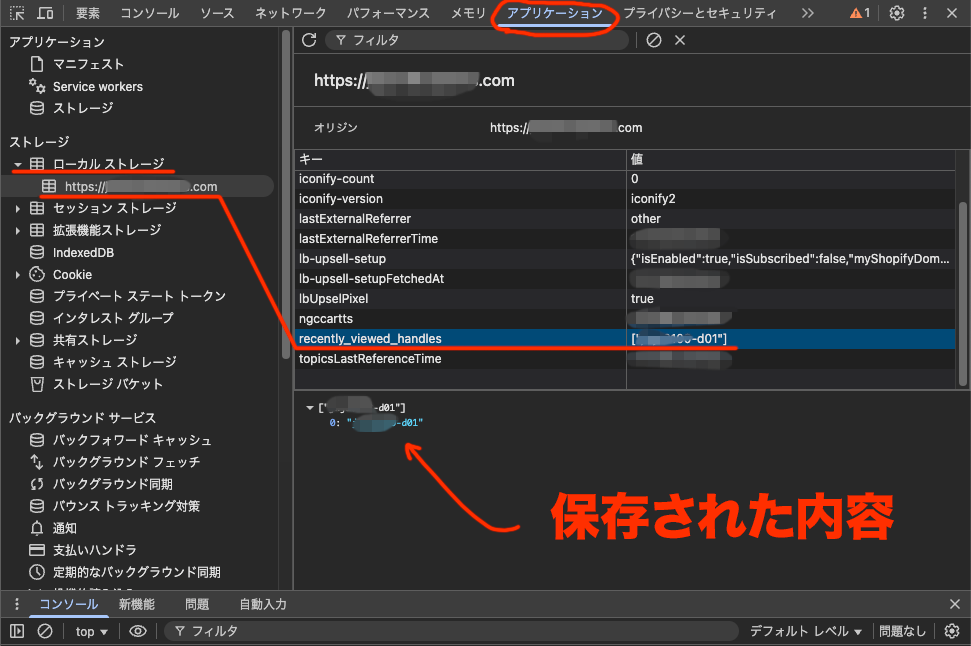
これは商品を1件見た形跡のようですね。
Console で直接確認するスクリプトも教えてもらいました。
//またはJSONとして整形版で見たい時
JSON.parse(localStorage.getItem('recently_viewed_handles'))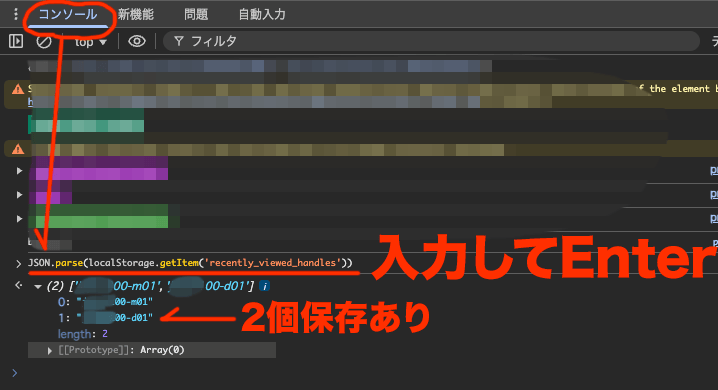
↑違う商品を見たので、1つ増えています。
確認できると少し楽しいかも。
星間旅路のメロディ
「宇宙の静けさに包まれながら、漂流する過去の音楽を捜し求め、銀河の奥底でその旋律に耳を傾ける。」
「この電波はどこの星からきたのだろうか。」
水の豊かな惑星の歌。
生命も輝いていた、そんな雰囲気がします。